
UU7GAME Mobile App

The UU7GAME app navigates via five bottom tabs (Home, Promo, a rewards wheel, Earn, Mine) with games split into Hot/Casino/Slot/Games/Fishing categories. Deposits run ₹100–₹50,000 with a 100% first-deposit match (3x wagering), phone verification is required, and the app runs a VIP tier + agent/club rebate system alongside daily spin rewards.
The UU7GAME mobile app is built around five bottom-navigation tabs — Home, Promo, a central rewards wheel, Earn, and Mine — with games organized into a left-hand rail of categories on the home screen. This guide walks through what's actually inside the app: navigation, game categories, the deposit screen's real numbers, and the rewards/VIP system, all based on the app's own interface rather than a general description. For getting the app installed in the first place, our APK Download Guide covers that separately, and our Games Overview covers the game categories at a higher level across the whole platform.
Home Screen and Navigation
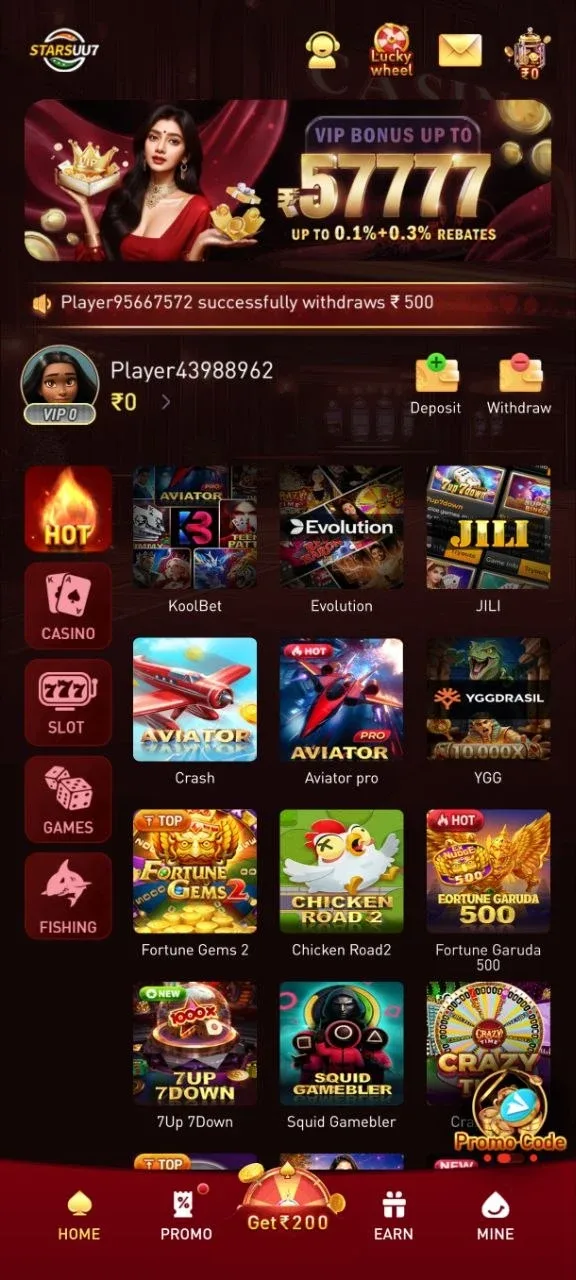
The bottom navigation bar has five entries: Home, Promo, a central "Get ₹200" wheel icon, Earn, and Mine (account/profile). The top bar carries the logo, a customer support icon, a Lucky Wheel shortcut, a message inbox icon, and the current wallet balance. On the home screen itself, a left-hand vertical rail switches between five game-category tabs: Hot, Casino, Slot, Games, and Fishing, each swapping the main content area to that category's titles without leaving the home screen.
A rotating ticker near the top of the home screen shows recent withdrawal activity (e.g., "PlayerXXXXXXXX successfully withdraws ₹500") — a live social-proof element rather than a personal notification, and promotional banners for whatever the platform's current campaigns are (VIP bonuses, invitation challenges, ranking events) rotate above it.
The specific banners rotating through the home screen change over time as campaigns start and end — at one point this included a time-boxed leaderboard event ("Rise to the Top 10, Claim Your Fortune," running a specific two-week window) and an agent-recruitment banner advertising a commission-income promotion. Treat any specific figure in a rotating banner as a temporary marketing claim tied to that campaign's own terms, not a permanent platform feature — the VIP and rebate structures covered later in this guide are the more stable, ongoing mechanics.
Game Categories Inside the App
Each of the five home-screen tabs surfaces a different slice of the platform's game library, and several third-party game providers are visibly integrated rather than everything being built in-house:
Hot — a mixed shelf of currently-promoted titles across categories, including crash-style games (Crash, Aviator Pro), and provider banners for KoolBet, Evolution, and JILI.
Casino — live-dealer and sports content specifically, with SABA Sports, Evolution (including its Crazy Time game show), a generic Sports banner, and Ezugi all appearing as distinct provider sections.
Slot — slot-specific provider shelves, including JILI, PG (Pocket Games Soft), Microgaming, and JDB.
Games — card and board titles: Rummy, Teen Patti (including a "Teenpatti 20-20" variant and an "AK47 Teen Patti" variant), Ludo Quick, Pusoy Go, Callbreak Quick, and Tongits Go.
Fishing — arcade fishing titles including Mega Fishing, Jackpot Fishing, Cai Shen Fishing, and Dragon Fishing II.
Rummy sits alongside several other card formats in the Games tab rather than standing alone — Teen Patti's multiple named variants in particular suggest the app treats it as its own mini-category rather than a single fixed game. Our Rummy Guide covers the specific formats, tables, and getting-started flow for rummy in full depth; this guide only covers where it sits inside the app's navigation.
The presence of named third-party studios (Evolution, Ezugi, JILI, PG, Microgaming, JDB, SABA Sports) confirms the app aggregates content from multiple established providers rather than running a single in-house engine — a common structure across Indian real-money gaming apps, and worth knowing since it means game rules/RTP/volatility genuinely vary title to title even within one category, the same point our Slots Guide and Casino Games Guide make about the platform's slot and live-casino content generally.
Aviator and Other Crash-Style Games
Crash-format games appear under the Hot tab specifically as "Crash" and "Aviator Pro," alongside other multiplier-style titles like Fortune Gems 2, Chicken Road 2, Fortune Garuda 500, 7Up 7Down, and Squid Gamebler. These sit in the same broad genre as Aviator — a rising multiplier you cash out of before it crashes — though exact mechanics (multiplier curve, provable-fairness method) vary by the specific title and provider, and we haven't independently verified the fine details of each one individually.
Making Your First Deposit In the App
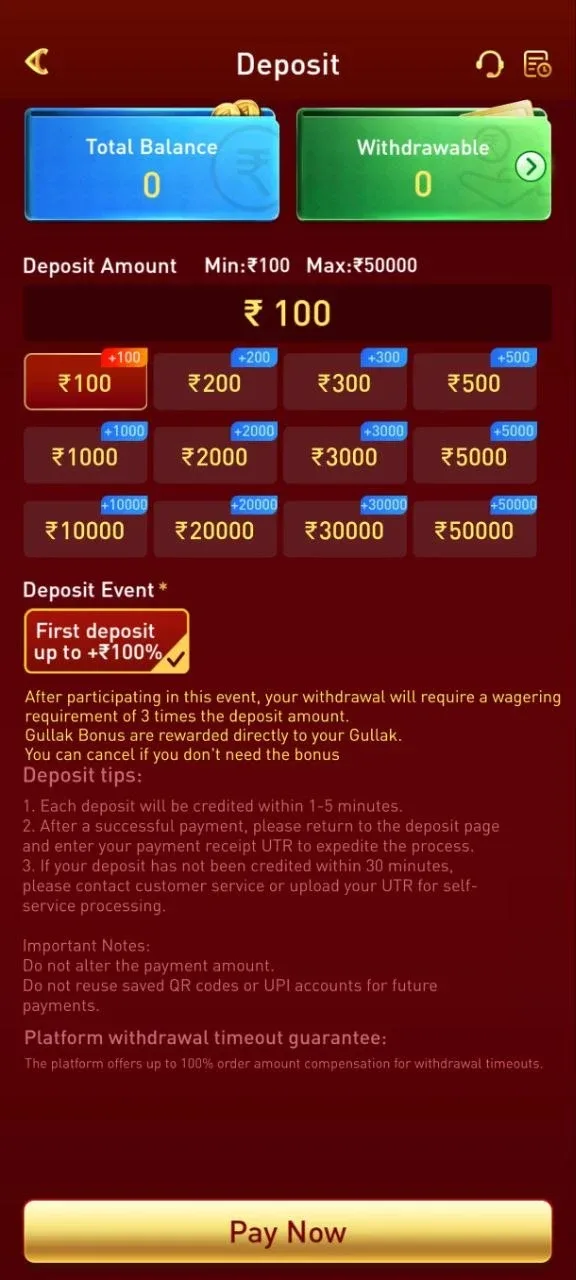
The deposit screen shows two separate balance figures — Total Balance and Withdrawable — a distinction worth understanding before your first deposit, since bonus funds and withdrawable cash aren't automatically the same thing. Total Balance reflects everything in your account, including any bonus credit still working through a wagering requirement; Withdrawable is specifically what you could cash out right now. Watching both numbers separately is the easiest way to tell whether a deposit bonus has actually cleared, rather than assuming the whole Total Balance figure is available to withdraw.
The deposit amount field enforces a minimum of ₹100 and a maximum of ₹50,000 per transaction, with quick-select buttons at ₹100, ₹200, ₹300, ₹500, ₹1,000, ₹2,000, ₹3,000, ₹5,000, ₹10,000, ₹20,000, ₹30,000, and ₹50,000. Picking a quick-select amount rather than typing a custom figure is purely a convenience — the same minimum and maximum apply either way, and a custom amount between the listed tiers is accepted as long as it's within that ₹100–₹50,000 range.
Every quick-select amount displays a matching bonus tag (e.g., a ₹1,000 deposit shows "+1000") — the app's First Deposit Event credits a 100% match on a first deposit. That bonus comes with a stated wagering requirement of 3 times the deposit amount before it can be withdrawn, and is credited to a separate "Gullak" (a piggy-bank-style bonus wallet distinct from your main withdrawable balance) — the app explicitly states this bonus can be cancelled if you don't want it, rather than being forced on every deposit.
The deposit screen's own tips are worth repeating exactly as shown: deposits are credited within 1–5 minutes normally; after paying, returning to the deposit page and entering your payment's UTR number can expedite processing; and if a deposit hasn't credited within 30 minutes, the stated options are contacting customer service or uploading the UTR for self-service processing. Two explicit warnings also appear on this screen: don't alter the payment amount from what the app generated, and don't reuse a previously-saved QR code or UPI account for a later payment — each deposit should use a freshly generated payment method. The screen also states a "platform withdrawal timeout guarantee" of up to 100% order-amount compensation if a withdrawal times out.
For the fuller picture of deposit/withdrawal mechanics beyond what's on this one screen, our Deposit and Withdrawal Guide covers processing times and payment methods in more depth.
Phone Number Verification
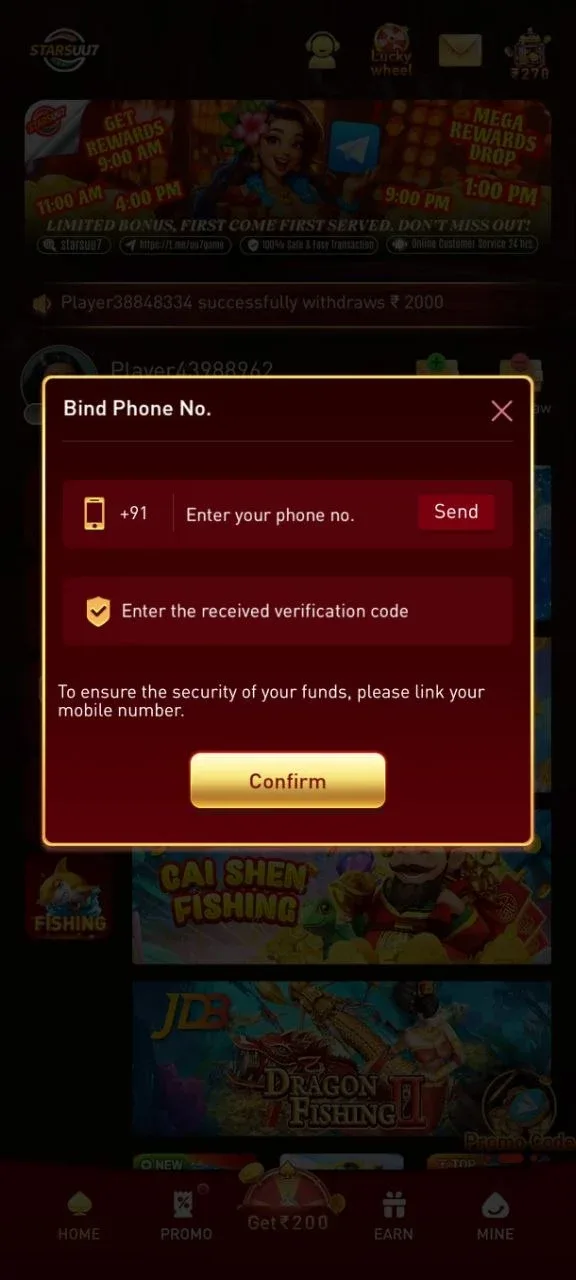
The app prompts you to "Bind" a phone number tied to a +91 country code, sending a one-time verification code by SMS to confirm it. The app frames this explicitly as a funds-security step rather than an optional add-on — worth completing early, since it's tied to account and withdrawal security rather than being a marketing opt-in.
Rewards and Promotions Inside the App
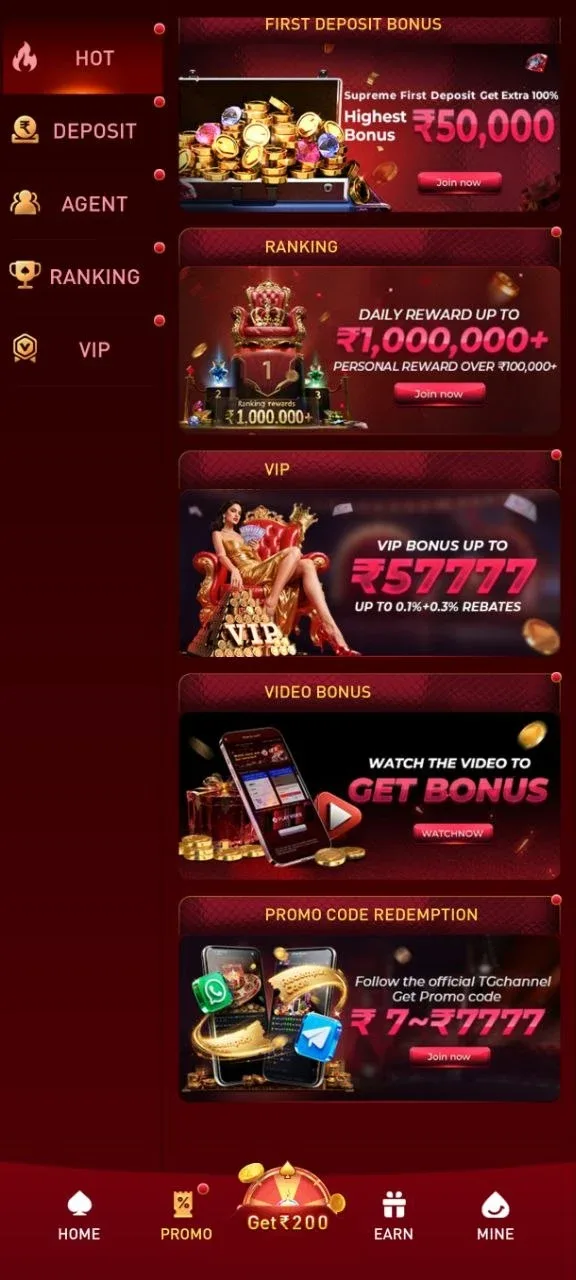
The Promo tab organizes its own sidebar into five sections — Hot, Deposit, Agent, Ranking, and VIP — each surfacing a different set of active campaigns. Based on what's actually shown in the app, the promotional mechanics include:
Lucky Wheel — a daily spin (labeled "Cash Everyday") with a choose-your-reward gift-box step, landing on a wheel with cash segments and a countdown timer to the next free spin; winnings accumulate into a small on-screen balance with a Cash Out option.
Get ₹200 invitation challenge — a shareable invitation code and referral-bonus mechanic, described in-app as "no limit."
First Deposit Bonus — the 100% first-deposit match already covered above, advertised up to ₹50,000.
VIP program — bonuses advertised up to ₹57,777 with stated rebates of 0.1% plus 0.3%.
Ranking/leaderboard events — time-boxed leaderboard competitions (one observed running from mid-May to late-May 2026) with daily rewards advertised up to ₹1,000,000 and personal rewards over ₹100,000.
Promo code redemption — codes distributed through the platform's official Telegram channel, with in-app redemption values advertised between ₹7 and ₹7,777.
As with any bonus offer, the specific terms (wagering multiples, expiry, eligible games) are set per-promotion and shown at the point of opting in — the numbers above are what the app itself advertises, not independently verified payout data. Reading a promotion's own terms before opting in matters more than the headline number, since the wagering requirement attached to a bonus determines how easily (or not) it actually converts into withdrawable balance.
VIP Tiers and the Agent/Club System
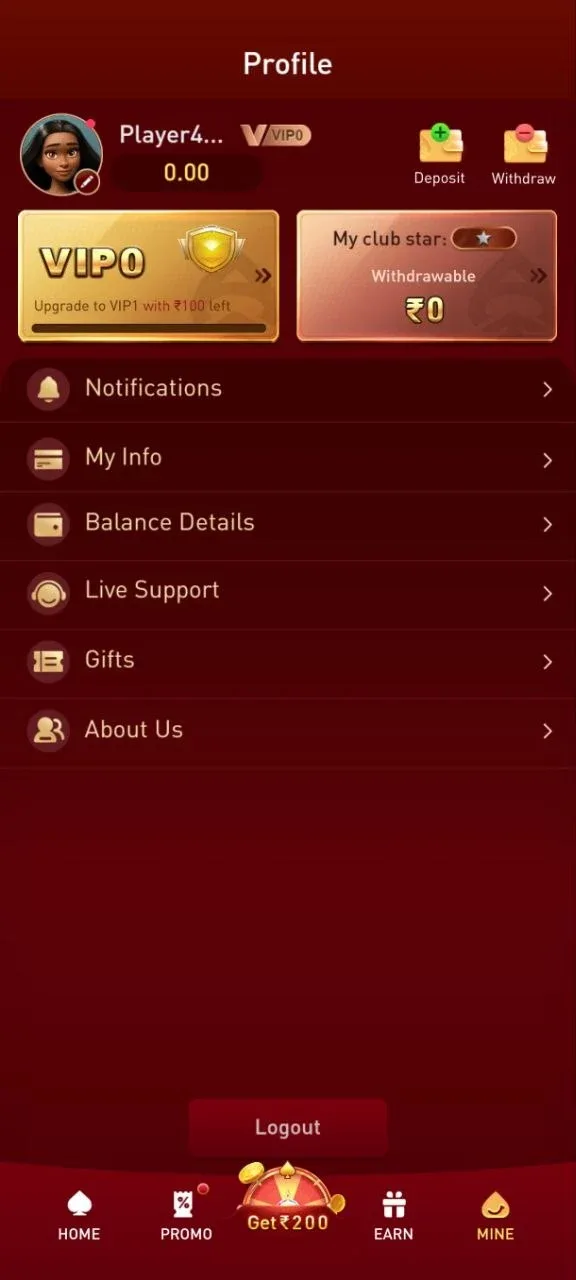
The Mine (profile) tab shows a VIP progress card — for example, a VIP0 account might show "Upgrade to VIP1 with ₹100 left," indicating VIP tier progress is tied to a cumulative deposit or turnover threshold rather than time-based loyalty alone. Separately, the Earn tab runs a "club" style referral/agent system: a "My team club" panel tracks Club Stars, a club member count (shown as a fraction, e.g., 0/5 slots filled), and a club bet target (e.g., ₹0 of a ₹200,000 target).
Underneath that sits a rebate structure: a bet rebate of up to 0.3%, a first-deposit rebate of 2%, and invite rewards advertised up to ₹6,000. Rewards are split into a withdrawable balance (with its own Claim/Detail actions) and running Total Rewards / Today's Rewards figures, and the app provides direct one-tap sharing to Telegram, WhatsApp, and Instagram to invite others into your club.
The club member slot count (shown as a fraction like 0/5) and the club bet target (shown as a running total against a fixed goal like ₹200,000) both suggest the club/agent system rewards scale with group activity rather than paying out purely on your own individual play — the more people in your club and the more they collectively wager, the more the club-level rewards move. This is a separate track from the VIP tier system on the profile tab, which tracks your own account's deposit/turnover progress specifically rather than group activity.
Managing Your Account
The Mine (profile) tab's menu covers the standard account-management set: Notifications, My Info, Balance Details, Live Support, Gifts, About Us, and a Logout action. Deposit and Withdraw shortcuts sit at the top of this screen alongside your VIP tier badge, so the two most common actions don't require navigating back to the home screen first.
Live Support is worth knowing the location of before you actually need it — if a deposit runs past the 30-minute window mentioned on the deposit screen, or a withdrawal times out, this is the fastest path to a human rather than searching through the Promo or Earn tabs. Balance Details separately gives a transaction-level view distinct from the single headline Total Balance / Withdrawable figures shown elsewhere, useful for reconciling exactly which deposit or bonus a given balance change came from.
Common Questions
What's the minimum and maximum deposit in the UU7GAME app? ₹100 minimum and ₹50,000 maximum per transaction, based on the app's own deposit screen.
Does the UU7GAME app require phone verification? Yes — the app prompts you to bind a +91 phone number with an SMS-delivered verification code, framed as a funds-security requirement.
What game providers are integrated into the UU7GAME app? Provider banners visible in the app include Evolution, Ezugi, JILI, PG (Pocket Games Soft), Microgaming, JDB, and SABA Sports, spread across the Casino and Slot tabs specifically.
Is the first deposit bonus automatic? The app shows a 100% first-deposit match by default on the deposit screen, credited to a separate "Gullak" bonus wallet with a 3x wagering requirement — the app states this can be cancelled if you don't want it.
What's the difference between Total Balance and Withdrawable balance? Total Balance reflects everything in the account, including bonus credit still under a wagering requirement; Withdrawable is specifically what can be cashed out right now.
For installing the app itself, see our APK Download Guide; for the full deposit and withdrawal mechanics, our Deposit and Withdrawal Guide goes deeper; and for a category-by-category look at the games themselves, our Games Overview, Slots Guide, Casino Games Guide, and Rummy Guide each cover one category in full depth. Whatever you play, our Responsible Gaming guidelines are worth reading first.
Frequently Asked Questions

Written by
Rohan KapoorReviews & Trust Editor
Rohan covers platform reviews, bonus terms, and payments and security topics for UU7 and checks every platform claim against its own published terms before it goes to print.
Sources
- 1UPI
Comments
Related Reading
 App Tutorials
UU7GAME Official Site Guide
How to confirm you're on UU7GAME's real official site — spotting fake clones, phishing pages, and unofficial APK sources before you deposit or log in.
 App Tutorials
UU7GAME Login Guide
How to log in to UU7GAME, what to do if login isn't working, and login security tips — with platform-specific steps flagged for verification.
 App Tutorials
UU7GAME Aviator Guide
A real look at UU7GAME's Aviator — dual betting, auto cash-out, bet limits, and how a round actually plays out, based on the game's own interface.
 App Tutorials
UU7GAME Casino Games Guide
Rules and strategy for UU7GAME's live casino games — roulette, blackjack, baccarat, and poker — explained clearly for players new to live-dealer formats.